How to Watch CCTV Footage on Your Phone While Away from Home
Security is a relentless priority, and your peace of mind should be too. If you’re traveling, on vacation, or working late into the night, staying informed about your home or business is essential. Thanks to modern CCTV technology, keeping an eye on your property has never been more convenient, ensuring safety and reassurance at all times.
In this guide, we’ll walk you through everything you need to know to view your CCTV footage remotely, so you can monitor your space virtually from anywhere.
Why Remote CCTV Monitoring Matters
Your security system isn’t very good if you can only check it when you’re physically present. Remote access transforms your CCTV setup from a reactive tool into a proactive guardian of your property. When you can view CCTV footage from anywhere, you’re not just watching, you’re actively participating in your own security.
If it’s a concerned parent checking on their child’s safety and well-being, a business owner overseeing multiple store locations to ensure smooth operations, or a homeowner verifying security measures during a holiday, remote access offers invaluable peace of mind.
Before delving into technical details, assess your current setup. Many modern CCTV systems come with built-in cloud connectivity, whereas older models may require additional hardware. Consult your camera’s documentation to verify compatibility and proper integration with your security system.
Essential Requirements for Remote Access
Getting started with how to watch CCTV remotely on mobile doesn’t require advanced technical skills. You’ll need a stable internet connection, a smartphone or tablet, and the manufacturer’s app or a compatible alternative. Some systems use cloud-based platforms, while others rely on direct network connections.
Your CCTV system needs to connect to your network using Wi-Fi or Ethernet, with a stable internet connection. Most systems function effectively with standard broadband. Position your router centrally for coverage, and use wired Ethernet for CCTV when possible.
Your smartphone acts as a comprehensive security hub, allowing you to monitor your surveillance cameras remotely. Both Android and iOS devices support various CCTV monitoring apps; however, availability may vary by manufacturer. Always download the official app from your CCTV system’s manufacturer to ensure full compatibility and security.
Setting Up Your Remote CCTV Monitoring System
Creating a remote CCTV monitoring setup involves several straightforward steps that most people can complete without professional assistance. Access your CCTV system’s admin interface through a web browser on your computer to enable remote access features and create user accounts.
Configuration checklist:
- Change default login credentials immediately
- Enable remote access or cloud connectivity features
- Create strong passwords with mixed characters
- Download the official mobile app
- Test the connection thoroughly
Security must be built in from day one. Use strong, unique passwords and activate two-factor authentication if possible. Refrain from using public Wi-Fi when accessing your CCTV system, and ensure you regularly update your system’s firmware and mobile application. Manufacturers issue updates to fix security flaws, and keeping your system current helps prevent exploits.
Accessing Your Cameras Remotely
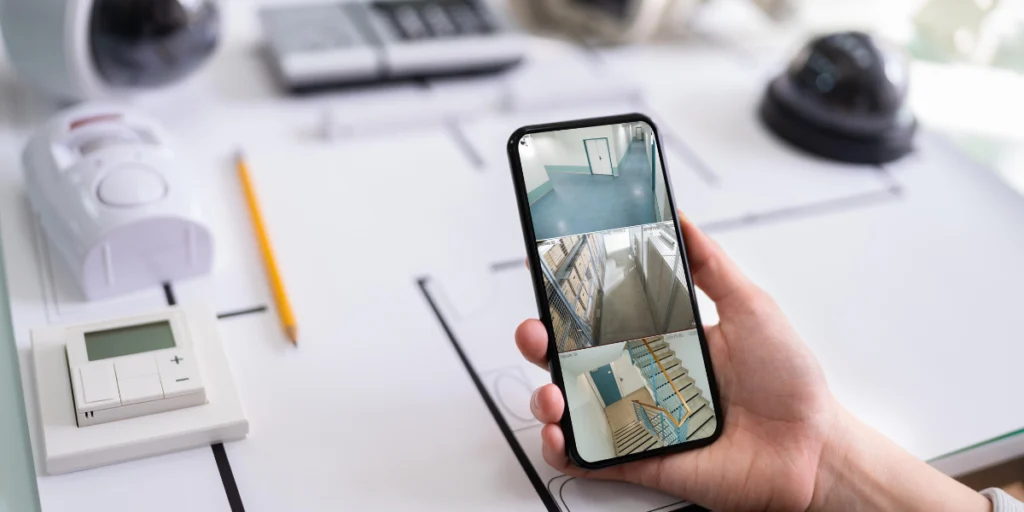
Once setup is complete, you can access your security cameras when you’re away from home. Opening your app displays all connected cameras with live feeds and recorded footage archives.
When you watch live CCTV feed on your phone, you’re seeing live video streaming from your cameras, enabling immediate visibility for responding to real-time situations. The live view displays all cameras in grid or list format. Tap any for a full-screen view.
Most apps allow seamless camera switching, zooming, and even controlling pan-and-tilt movements if your cameras support it. Your app’s playback feature lets you scrub through recorded footage to search for specific incidents in chronological order.
This archival access proves invaluable if you need evidence of an incident. Many systems offer motion detection alerts that bookmark interesting footage, making it easier to find relevant sections without reviewing everything.
Enhancing Your Remote Monitoring
To maximize your remote CCTV capabilities, explore your app’s advanced features. Most systems support motion alerts, sending notifications when activity is detected. Customize these alerts by camera and sensitivity level to reduce false alarms while catching genuine concerns.
When shopping for new equipment, finding the best CCTV camera shop in Pakistan makes a tremendous difference. A reputable supplier assesses your needs and recommends systems that integrate seamlessly with mobile access. We excel in Pakistan with expertise, quality, and support, ensuring a system that works for your needs.
Configure push notifications for important events. Balance security awareness with notification fatigue by choosing which alerts matter to you. Most apps let you adjust video quality and frame rate. Higher quality consumes more data, while standard quality conserves resources. Find the balance that works for your internet speed and needs.
Troubleshooting Common Issues
Here are some common troubleshooting issues you’ll encounter.
- Connections drop unexpectedly, causing issues with the CCTV system.
- First, restart both your CCTV system and your router, as this resolves most common problems.
- Ensure your internet connection is stable and functioning properly.
- Clear the cache in your mobile app, force-close it, then reopen to refresh the connection.
- Check for firmware updates; outdated firmware may cause compatibility issues with the latest app version.
- If issues continue, contact your CCTV system manufacturer’s support team.
- They have specialized knowledge and can provide assistance via phone or email to resolve persistent problems.
Bottom Line
Remote CCTV monitoring transforms traditional security systems into active, real-time protection tools that put control directly in your hands. Instead of relying solely on on-site monitoring or recorded footage, you can now view live camera feeds, receive instant alerts, and respond quickly to unusual activity from anywhere in the world using your smartphone.
Ultimately, remote monitoring adds a powerful layer of convenience, responsiveness, and peace of mind, making modern CCTV systems not just a security investment, but an essential part of smart property management.
When evaluating the price of a High-Tech camera in Pakistan, keep in mind that high-quality equipment, combined with reliable remote access, offers a robust security solution. We offer comprehensive products and services, delivering cutting-edge technology and dependable customer support!


Lets's Get Social
We are a dedicated professional company that deliver high-quality cameras all over Pakistan

Shariq Tahir
Share On
Related Post