Two-Way Audio CCTV: Use Indoor & Gate Cameras as Intercom
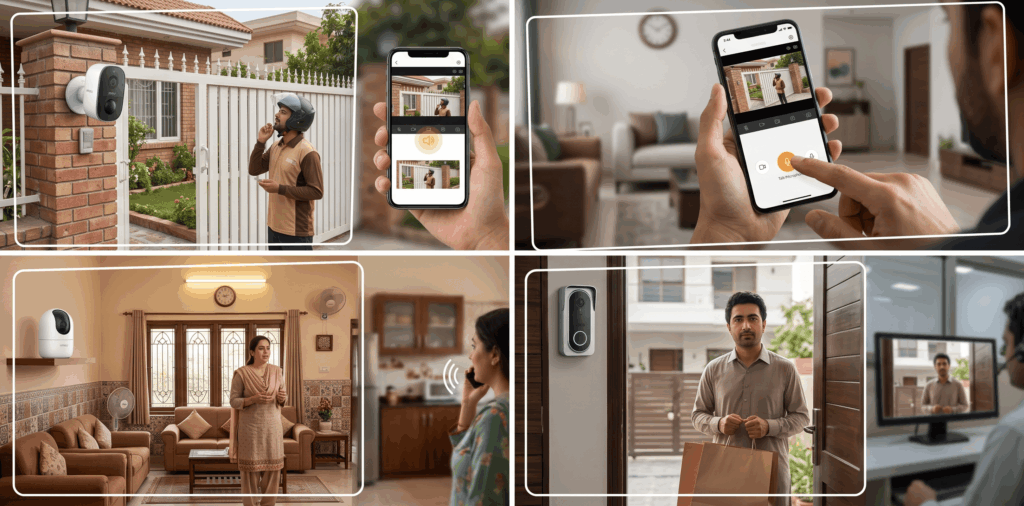
A CCTV camera used to have one main job: capture video. Today, many smart security cameras can also let you listen and speak in real time. That simple addition can change how you use a security system. A visitor arrives at the gate, a delivery rider reaches the entrance, or someone inside the house needs your attention. Instead of opening the door immediately or calling someone, you can communicate through the camera.
But how does two-way audio CCTV work in practical terms? More importantly, can it genuinely replace a home intercom? For basic communication, a two-way audio camera can serve as a convenient home intercom alternative. However, homes that need doorbell calling, indoor monitors, remote unlocking, or integrated access control may be better served by a dedicated video intercom system.
What Is Two-Way Audio in CCTV?
Two-way audio uses a microphone to capture sound near the camera and a speaker to play your voice back at the camera location. You normally control the conversation through a mobile application or compatible security system.
The process is straightforward. The camera captures video and local audio. The connected system sends that information to your phone. When you press the talk button in the app, your voice travels back through the network and plays through the camera’s speaker. The result is two-way communication without standing physically beside the camera.
Microphone and Speaker Work Together
The microphone handles incoming sound, while the speaker handles outgoing speech. Depending on the model, cameras may provide controls for speaker volume, audio recording, or other audio settings. Advanced intercom systems may also provide call routing and access-control functions.
Not every camera handles audio in exactly the same way. Some support push-to-talk communication, while others may provide additional hands-free functions.
The Mobile App Is Usually the Control Point
For Wi-Fi cameras, the smartphone application is often where communication begins. You open the live camera view, listen to the audio, and press the talk function to speak. This makes the feature particularly useful when you are away from home. You may be at work, traveling, or simply in another room and still communicate with someone near the camera.
Can CCTV Cameras Be Used as an Intercom?
Yes, many cameras can perform basic intercom functions. A camera with two-way audio lets you identify a visitor, ask why they are at the gate, give instructions to a delivery person, or communicate with someone inside the property.
However, a security camera is not automatically a complete access-control intercom. Dedicated video intercom systems may include call buttons, directory functions, door release mechanisms, and controlled user access. Some video intercom products, for example, combine live video, two-way audio, call routing, and remote unlocking features.
For a typical house, a two-way audio camera may be sufficient. Larger properties may benefit from a dedicated video intercom system.
Two-Way Audio CCTV vs. Dedicated Video Intercom
The right choice depends on how much communication and access control your property requires.
| Feature | Two-Way Audio CCTV Camera | Dedicated Video Intercom |
| Live video | Yes, depending on the model. | Yes. |
| Two-way audio | Yes. | Yes. |
| Mobile remote communication | Common on connected models. | Common on smart systems. |
| Motion or security alerts | Often available. | May be available. |
| Doorbell or call button | Usually not built in. | Common. |
| Remote door/gate unlocking | Model-dependent and less common. | Common on suitable systems. |
| Indoor monitor | Usually not required. | Often available. |
| Access-control integration | Limited or model-dependent. | Designed for this purpose. |
| Best suited for | Basic communication and surveillance. | Visitor management and controlled entry. |
A two-way audio CCTV camera can therefore be a practical home intercom alternative when communication is the main requirement. A dedicated video intercom is more appropriate when visitor calling and controlled entry are important parts of the system.
Indoor Cameras as Home Intercoms
Indoor cameras can be particularly useful for communication between rooms. A camera installed in a living room, hallway, kitchen, or entrance lets a homeowner monitor activity and communicate with family members. This can also help you check on children, elderly family members, or household staff when appropriate privacy arrangements are in place.
Privacy should remain a priority. Do not install cameras in bedrooms, bathrooms, or other spaces where people reasonably expect privacy.
Communication Inside the House
An indoor camera can make short conversations more convenient. Someone in another room can hear your voice through the camera’s speaker, and you can listen through the microphone. This is especially helpful in larger homes where calling across rooms is inconvenient.
Remote Communication
Remote access adds another layer of convenience. If someone arrives while you are away, you can open the camera app, check the live image, and speak to them. You can simply give instructions or ask the visitor to wait.
Gate Cameras as Visitor Intercoms
A gate is one of the most useful locations for two-way audio. Visitors often need confirmation before entering a property. A gate-mounted camera with a microphone and speaker lets you communicate without opening the gate right away.
Identify Before You Respond
Video gives you visual information, while audio lets you ask questions. This combination is more useful than a camera that only sends an image. You can ask a delivery person to leave a package at a designated location or tell a known visitor to wait briefly.
Better Control at Larger Properties
For houses with driveways, boundary gates, or multiple entrances, communication can reduce unnecessary trips to the door. Dedicated video intercom systems can go further by integrating communication with access control. Depending on the equipment, an authorized user may be able to unlock an entrance remotely after confirming the visitor’s identity.
How to Talk Through a Security Camera
The exact steps vary by manufacturer, but the process is generally similar. First, open the camera’s mobile application and select the relevant camera. Open the live view and check that the audio function is available. Press the talk or microphone button, speak clearly, and release it when finished if the system uses push-to-talk communication.
Keep the microphone and speaker away from unnecessary noise sources. A camera positioned directly beside a loud fan, generator, or traffic area may make conversations less comfortable.
Test the camera before mounting it permanently. Stand several meters away and confirm that your voice reaches the camera clearly. Also test the reverse direction. You should be able to hear the person near the camera without excessive distortion.
Benefits of Two-Way Audio Security Cameras
The main advantages of this system include enhanced convenience and practical benefits:
- Communication can occur without opening a gate or door.
- You can respond to visitors even when away from the property.
- Two-way audio assists with delivery instructions and routine communication.
- For small shops and offices, it reduces unnecessary movement between work areas.
- A camera that integrates video, audio, motion alerts, and remote access can meet multiple daily needs, not just record.
What to Check Before Buying
Treat audio quality as seriously as video quality. Look for a camera with a clear microphone and a speaker suitable for the intended environment. Network reliability is also important. Poor connectivity can cause delays in live video and conversation. Storage should be considered too. Some cameras support microSD storage, while others rely on cloud services or an NVR. The right option depends on how much footage you need to retain.
For outdoor installations, verify the weather-resistance rating and confirm the camera suits the environment. IMOU cameras undergo testing in extreme weather conditions. For the best IMOU products, turn to Orient CCTV, and get the best security solutions for your space.
Choosing the Best CCTV Camera for Home Intercom
The best CCTV camera for home intercom should provide clear video, dependable two-way audio, reliable night vision, stable connectivity, and an easy-to-use app.
For a front door, an indoor Wi-Fi camera may be enough. For a boundary gate, an outdoor-rated model with a strong speaker and microphone is more appropriate. For properties requiring controlled entry, a dedicated video intercom with access-control integration may be the better choice.
FAQs
1. Does every CCTV camera support two-way audio?
No. A camera must have both a microphone and speaker, plus software that supports two-way communication.
2. Can I talk through a CCTV camera when I am away from home?
Yes, if the camera supports remote access and has an active network connection. You can usually use the manufacturer’s mobile application to access live video and talk through the camera.
3. Is two-way audio useful at a gate?
Yes. It lets you identify visitors, communicate with delivery personnel, and give instructions without opening the gate immediately.
4. Does two-way audio require the Internet?
Remote communication usually requires an Internet connection. Some local systems can communicate within a network, but functionality depends on the equipment and configuration.
5. Can a CCTV camera replace a dedicated intercom?
For basic communication, many two-way audio cameras can serve the purpose. A dedicated video intercom is better when you need features such as call buttons, user management, door release, and integrated access control.
Bottom Line
Two-way audio turns a CCTV camera into a more interactive security device. It allows homeowners to listen, respond, and communicate with people near the camera while maintaining visual awareness of the situation. Indoor cameras can support room-to-room communication, while suitable outdoor models can work effectively at gates and entrances. The right choice depends on audio quality, network stability, placement, storage, and the level of access control required.
Orient CCTV offers security camera options designed for different residential and commercial requirements. If you need outdoor cameras with communication features, compare the available models carefully and select one that matches your gate, entrance, or property layout.


Lets's Get Social
We are a dedicated professional company that deliver high-quality cameras all over Pakistan

Shariq Tahir
Share On
Related Post